add tag
samcarter
The `vlines,hlines` keys of tabularray make it very easy to add lines everywhere, but how to remove some of them again? For example to remove the lines in the top left corner? In the documentation, I can only see solid, dashed or dotted line styles, but no empty ones.

Here a quick hack, in which I change the colour of the top left corner to white in order to hide the lines:

```
\documentclass[border = 3pt]{standalone}

\usepackage{tabularray}
\usepackage{xcolor}

\begin{document}

\begin{tblr}{
  hlines,vlines,
  vline{1} = {1}{fg=white},
  hline{1} = {1}{fg=white}
}
  x & x & x\\
  x & x & x\\
  x & x & x\\
\end{tblr}

\end{document}
```
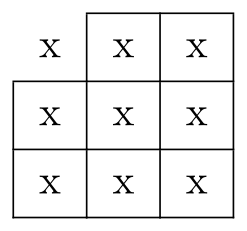
![document-1.png](/image?hash=ae6a4c9488d4507d5f9c1efb69ce23b71b189af3137cac0405b6d2fa62a5c055)

Top Answer
samcarter
One could define a new dash style, which is always off:

```
\documentclass[border = 3pt]{standalone}

\usepackage{tabularray}

\NewTblrDashStyle{empty}{on 0pt off \maxdimen}

\begin{document}

\begin{tblr}{
  hlines,vlines,
  vline{1} = {1}{empty},
  hline{1} = {1}{empty}
}
  x & x & x\\
  x & x & x\\
  x & x & x\\
\end{tblr}

\end{document}
```

![document-1.png](/image?hash=ae6a4c9488d4507d5f9c1efb69ce23b71b189af3137cac0405b6d2fa62a5c055)

This room is for discussion about this question.

Once logged in you can direct comments to any contributor here.

Enter question or answer id or url (and optionally further answer ids/urls from the same question) from

Separate each id/url with a space. No need to list your own answers; they will be imported automatically.