CarLaTeX

This simple example works:
```
\begin{filecontents*}{example.csv}
A
{51,502}
{121,151}
\end{filecontents*}
\documentclass{article}
\usepackage{tabularray}
\usepackage{csvsimple-l3}
\begin{document}
\csvreader[
head=true,
tabularray = {
width=\linewidth,
colspec={r},
},
table head = {First\\},
]
{example.csv}
{}
{\csvlinetotablerow}
\end{document}
```
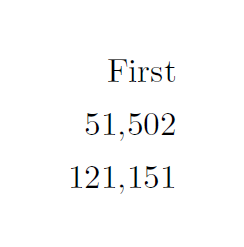
In case my `csv` has `"..."` around the numbers with comma as decimal point, in the [`csvsimple-l3` manual](https://ctan.mirror.garr.it/mirrors/ctan/macros/latex/contrib/csvsimple/csvsimple-l3.pdf) there is an hook to trasform `"..."` into `{...}`.
But it does not work:
```
\begin{filecontents*}{example.csv}
A
"51,502"
"121,151"
\end{filecontents*}
\documentclass{article}
\usepackage{tabularray}
\usepackage{csvsimple-l3}
\AddToHook{csvsimple/csvline}
{
\tl_set_eq:NN \l_tmpa_tl \csvline
\regex_replace_all:nnN { "([^"]+)" } { {\1} } \l_tmpa_tl
\tl_gset_eq:NN \csvline \l_tmpa_tl
}
\begin{document}
\csvreader[
head=true,
tabularray = {
width=\linewidth,
colspec={r},
},
table head = {First\\},
]
{example.csv}
{}
{\csvlinetotablerow}
\end{document}
```
The error is:
```
! Undefined control sequence.
\__hook_toplevel csvsimple/csvline -> \tl
_set_eq:NN \l _tmpa_tl \csvline \r...
l.26 {\csvlinetotablerow}
```
Is the hook correct? Or am I doing something wrong?
Top Answer
samcarter

Adding `\ExplSyntaxOn...\ExplSyntaxOff` seems to do the trick:
```
\begin{filecontents*}{example.csv}
A
"51,502"
"121,151"
\end{filecontents*}
\documentclass{article}
\usepackage{tabularray}
\usepackage{csvsimple-l3}
\ExplSyntaxOn
\AddToHook{csvsimple/csvline}
{
\tl_set_eq:NN \l_tmpa_tl \csvline
\regex_replace_all:nnN { "([^"]+)" } { {\1} } \l_tmpa_tl
\tl_gset_eq:NN \csvline \l_tmpa_tl
}
\ExplSyntaxOff
\begin{document}
\csvreader[
head=true,
tabularray = {
width=\linewidth,
colspec={r},
},
table head = {First\\},
]
{example.csv}
{}
{\csvlinetotablerow}
\end{document}
```

Answer #2
Skillmon

samcarter provided a valid answer for the problem at hand. However, running a regular expression over *all* data of a csv is *very* wasteful. Therefore this answer doesn't face the problem at hand but instead defines alternative code paths that should have better performance

# Assuming fixed category (best performance)

When we assume fixed category codes we can write a very tight and fast loop to simply replace all quoted blocks to be inside of `{}`. Whichever category code applies during reading the CSV file must be the one being active during the definition of `\cleanQuotes`:

```
\begin{filecontents*}{example.csv}
A
"51,502"
"121,151"
\end{filecontents*}

\documentclass{article}
\usepackage{tabularray}
\usepackage{csvsimple-l3}

\makeatletter
\newcommand\cleanQuotes[1]
  {%
    \edef\csvline{\cleanQuotes@\@empty#1"\cleanQuotes@"}%
  }
\long\def\cleanQuotes@ifend#1\cleanQuotes@{}
\long\def\cleanQuotes@#1"%
  {%
    \unexpanded\expandafter{#1}%
    \cleanQuotes@b\@empty
  }
\long\def\cleanQuotes@b#1"%
  {%
    \cleanQuotes@ifend#1\cleanQuotes@end\cleanQuotes@
    {\unexpanded\expandafter{#1}}%
    \cleanQuotes@\@empty
  }
\long\def\cleanQuotes@end\cleanQuotes@#1\cleanQuotes@\@empty{}%
\makeatother

\AddToHook{csvsimple/csvline}
  {%
    \expandafter\cleanQuotes\expandafter{\csvline}%
  }
\begin{document}
    \csvreader[
        head=true,
        tabularray = {
            width=\linewidth,
            colspec={r},
            },
        table head = {First\\},
        ]
        {example.csv}
        {}
        {\csvlinetotablerow}
\end{document}
```

# Supporting different category codes (still better than `l3regex`)

Since we only care for a single character code we can still be faster than `l3regex` by using a token-by-token (well, technically an item-by-item) parser, like the one defined in `etl` (*disclaimer:* I'm the author -- caveat: the used mechanism doesn't handle the edge case of an implicit `"`-token (`\let` to a token with the charcode of `"`)):

```
\begin{filecontents*}{example.csv}
A
"51,502"
"121,151"
\end{filecontents*}

\documentclass{article}
\usepackage{tabularray}
\usepackage{csvsimple-l3}

\usepackage{etl}

\ExplSyntaxOn
\cs_new_protected:Npn \cleanQuotes #1
  {
    \tl_set:Ne \csvline
      {
        \etl_act:nnnnn
          \__my_cleanQuotes:nN
          \__my_cleanQuotes:n
          \__my_cleanQuotes:nn
          { \__my_cleanQuotes_normal:NN \exp_not:n }
          {#1}
      }
  }
\cs_new:Npn \__my_cleanQuotes:nN #1#2
  { #1 {#2} }
\cs_new:Npn \__my_cleanQuotes:n #1
  { \use_ii:nn #1 { ~ } }
\cs_new:Npn \__my_cleanQuotes:nn #1#2
  { \use_ii:nn #1 { {#2} } }
\cs_new:Npn \__my_cleanQuotes_normal:NN #1#2
  {
    \token_if_eq_charcode:NNTF " #2
      {
        \etl_act_status:n
          { \__my_cleanQuotes_quote:NnN \__my_cleanQuotes_add:nn {} }
      }
      { \exp_not:N #2 }
  }
\cs_new:Npn \__my_cleanQuotes_add:nn #1#2
  {
    \etl_act_status:n
      { \__my_cleanQuotes_quote:NnN \__my_cleanQuotes_add:nn {#1#2} }
  }
\cs_new:Npn \__my_cleanQuotes_quote:NnN #1#2#3
  {
    \token_if_eq_charcode:NNTF " #3
      { { \exp_not:n {#2} } }
      {
        \etl_act_status:n
          { \__my_cleanQuotes_quote:NnN \__my_cleanQuotes_add:nn {#2#3} }
      }
  }
\ExplSyntaxOff

\AddToHook{csvsimple/csvline}
  {%
    \expandafter\cleanQuotes\expandafter{\csvline}%
  }
\begin{document}
    \csvreader[
        head=true,
        tabularray = {
            width=\linewidth,
            colspec={r},
            },
        table head = {First\\},
        ]
        {example.csv}
        {}
        {\csvlinetotablerow}
\end{document}
```